Aurum Instructor Documentation
This documentation shows instructors how to use Aurum, including creating and registering repository.
Get Started
If you are using this tool, we assume you have basic understand of the importance of using modern version control system such as Git, Mercurial and even SVN.
Terminology
- exercise repository contains test codes
Requirments
To interact with Aurum, you must have the followings ready:
- install aurum-cli (command-line interface)
- an editor
- BitBucket / GitHub account ready
As of now, we recommend using BitBucket because with an .edu email address, you can host unlimited private repositories there. We do not want to expose our exercise repository (containing test code) to the public!
Add teamglass7311 to repository
For each exercise repoistory, you must give teamglass7311 the BitBucket user READ access.
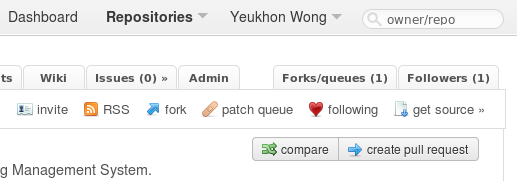
Visit your exercise repo and click on Admin
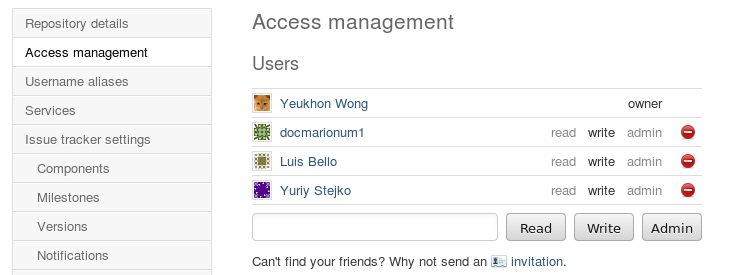
Click on Access Management

Enter teamglass7311 and click on READ button.
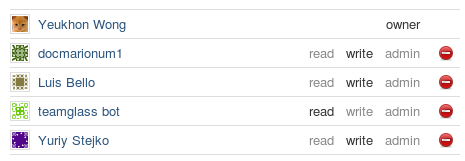
On success, you should now see teamglass7311 is given READ.
- Once this is done, teamglass7311 (our dear Aurum service) will be able to clone down your exercise
- repository during the execution.
Create an exercise repository
An exercise repository should contains the following, ideally
- config.yaml
- runner.py
- test_<name>*.py
An example written for C programming language is provided here. This example contains more than necessary because of the way test_<name>.py was written.
config.yaml
This file specifies how Aurum should execute and test student’s solution. See Exercise Configuration for configuration details.
An example (taken from the example repo above):
student_file: student.c
build:
    build_system: make
    build_file: student.c
run:
    student_soln_exe: student
    test_runner_file: runner.py

nose_report_file: nosetests.xml
run_student_file: True
run_nosetests: True

full_scores:
    test_binary_exists:
        full_score: 1
        description: Does the student binary exists?
    test_binary_same:
        full_score: 1
        description: Are the binary produced by student and instructor equal?
Warning
Avoid using TAB in configuration file. Use 4 spaces instead of tab, otherwise Aurum will fail to read the configuration file!
runner.py
This file should not be changed. We use this to run nosetest on student solution.
Simply grab the source code here we release.
Note
We will add support for the generating Aurum compatible repository skeleton. Stay tune.
test_<name>*.py
Instructor must write a valid unittest in Python. It can be a test suite comprised of multiple unittests in multiple .py files. We use nosetest on the server to run your test codes against student’s solution.
The example we given above has one test file called test_c_exercise.py.:
import os
import unittest
from yaml import safe_load
from subprocess import Popen, PIPE

class TestProblem1(unittest.TestCase):
        def setUp(self):
            data_config = ''
            with open('.datalist.yaml', 'r') as f:
                data_config = safe_load(f)
            self.data_location = data_config['dirname']

        def tearDown(self):
            pass

        def test_binary_exists(self):
            yes = os.path.exists(os.path.join(os.getcwd(),\
                            'student'))
            self.assertTrue(yes)

        def test_outputs_hello_world(self):
            cmd1 = ['./student']
            p1 = Popen(cmd1, stdout=PIPE, stderr=PIPE)
            out1, err1 = p1.communicate()

            cmd2 = ['./instructor_binary']
            p2 = Popen(cmd2, stdout=PIPE, stderr=PIPE)
            out2, err2 = p2.communicate()

            self.assertEqual(out1, out2)
            self.assertEqual(err1, err2)
This test code tests whether the output from student is exactly the same as the expected output in the instructor’s exectuable.
In this case, the instructor’s exectuable was packaged into the repository. Make sure you name them wisely so students can’t cheat by guessing common names such as instructor.exe.
Language specific
Although Exercise Configuration will explain all the options, it is compelling to repeat some of them here to address language specific configuration.
Compiled languages
If you are running a C or C++ course, you probably want to supply a Makefile so that Aurum will grab it (according to the build configuration in config.yaml) and build the student’s solution properly (with some libraries, e.g).
A simple Makefile may look like this
all: main
main: student.c
    gcc -Wall -o student student.c
This rule must match student_soln_exe configuration option in config.yaml, which specify the name of the executable based on student’s solution (which is usually used to test the output like the example above.)
For example, we have
student_file: student.c
build:
    build_system: make
    build_file: student.c
run:
    student_soln_exe: student
    test_runner_file: runner.py
Warning
Make sure you test your Makefile before distributing your repository. Makefile is also picky about spaces and indentication!
Python
Python can be compiled or interperted depending on the type of Python. We currently support CPython only.
If there is no explicit compilation required (besides CPython’s auto compilation to byte codes for optimization), then you can skip build option in the configuration. See Exercise Configuration for configuration details.